About
What is this?
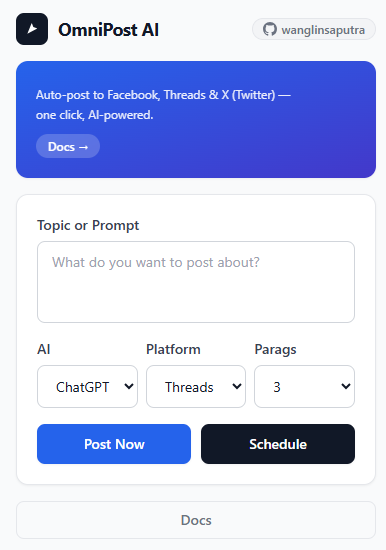
Chrome extension for multi-platform auto-posting. Type your idea, AI (ChatGPT, Claude, or Gemini) writes the post, publish to Facebook, Threads & X (Twitter).
No API keys needed. Just log into your accounts in Chrome.
AI
AI Models
ChatGPT • Claude • Gemini
Pick your preferred AI model. Each opens in a new incognito/chat tab.
ChatGPT uses temporary chat mode —
Claude opens claude.ai/new?incognito=true —
Gemini opens a fresh session.
-
Pick "Claude" in the AI dropdown
In the popup, select Claude from the AI model picker.
-
Write your prompt and click Post
Extension opens
claude.ai/new?incognito=true, pastes prompt, waits for response. -
Content posted automatically
Same workflow as ChatGPT — no extra steps needed.
Platform
Single post • No scheduling
Make sure you're logged into Facebook in Chrome.
-
Stay logged into Facebook
Keep an active session in Chrome.
-
Click "Post Now" in the popup
Extension opens Facebook, writes content, and posts.
-
Done
Post appears on your timeline.
Platform
X (Twitter)
Single tweet • 280 chars
Make sure you're logged into X in Chrome. Supports both x.com & twitter.com.
-
Stay logged into X
Keep an active session in Chrome.
-
Select "X" as platform
In the popup, pick X from the dropdown.
-
Click "Post Now"
AI limits to 280 characters. Posts automatically.
Platform
Threads
Multi-paragraph • Scheduling
Make sure you're logged into Threads in Chrome.
-
Set paragraph count (optional)
Set Paragraph Count (1-5). AI generates multi-post thread.
-
Click "Post Now" or "Schedule"
Post Now: Writes each paragraph. Schedule: Pick date/time.
-
Done
Uses
chrome.alarmsfor reliable posting.
Guide
How to Use
Getting Started
- Click OmniPost AI icon in Chrome toolbar.
- Log into target platform in Chrome.
Post Content
- Pick AI model (ChatGPT / Claude / Gemini).
- Pick Platform (Threads / Facebook / X).
- Set Paragraph Count (Threads only).
- Type content idea or topic.
- Click Post Now — AI generates & posts.
Platform Notes
- Threads: Multi-paragraph + scheduling.
- Facebook: Single post. No scheduling.
- X: Single tweet. 280 char limit.
- Instagram: Not yet supported.